Tennis Theme Wall Clock SVG for Laser and CNC Projects
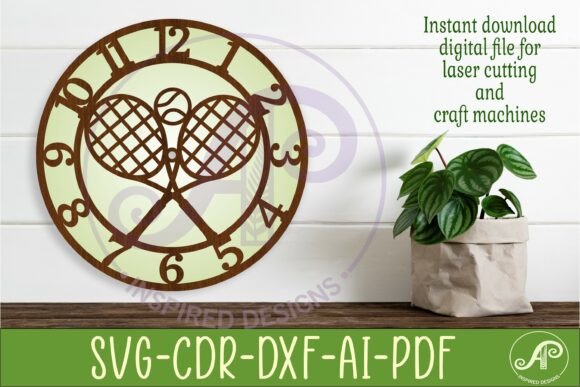
Imagine transforming a simple piece of wood or acrylic into a striking, functional timepiece that celebrates your love for tennis. This is exactly what the Tennis Theme Wall Clock SVG for Laser enables you to do. This digital download provides three distinct wall clock face templates, meticulously designed to be cut on laser machines, CNC routers, and other craft equipment. It’s a fantastic asset for anyone looking to create personalized home decor, unique gifts, or branded merchandise with a sporty flair.
This design package is built for versatility and ease of use. The files are saved in multiple formats—including SVG, DXF, AI, filled and outline SVG, PDF, and CDR—ensuring compatibility with virtually any software or machine you prefer, such as CorelDraw or LightBurn. The recommended cut size ranges from 25 to 50cm wide, with the files pre-set at 29cm (11.4 inches), and the center hole is precisely 8mm to accommodate standard clock hands. This attention to detail means you can focus on the creative process rather than technical adjustments.
Creative Applications and Project Ideas
The beauty of this SVG design lies in its potential. Beyond a straightforward wall clock for a sports-themed room, think about how it can elevate other projects. A coach might use it to create a memorable award for a team. A tennis club could produce branded clocks for their pro shop or as member gifts. Crafters can sell finished clocks at markets or online, offering a product that stands out from generic designs. The tennis motif, with its classic lines and ball details, adds a dynamic and energetic visual element.
For designers, this template serves as a brilliant starting point. You can integrate the clock face into larger compositions, such as a sports-themed poster or a social media graphic for a tennis tournament. The clean lines of the SVG files make it easy to customize colors, add text, or combine it with other design assets to create a cohesive brand identity for a tennis academy or a sports blog. It’s a practical design asset that bridges the gap between digital art and physical craft.
Tips for Selecting and Using Your Design Files
When working with any digital cut file, a few best practices ensure a smooth experience. First, always verify the file formats are compatible with your specific machine and software. This package covers the most common ones, making it a reliable choice. Second, consider the material you intend to use—wood, acrylic, or even metal—and adjust your machine’s settings for power and speed accordingly for a clean cut.
- Test Your Cut: Before committing to your final material, perform a small test cut on a scrap piece to fine-tune your settings.
- Finishing Touches: Plan your finishing process. Will you paint, stain, or apply a clear coat? The clock’s design can influence these choices.
- Hardware Sourcing: Remember to source the clock mechanism and hands separately, ensuring the shaft length matches the 8mm center hole and the thickness of your material.
Choosing a well-designed, professionally crafted template like this one saves significant time and reduces the frustration of troubleshooting design errors. It provides a solid foundation that you can trust to perform accurately, allowing your creativity to shine in the final product. Whether you’re a hobbyist crafting a weekend project or a small business owner expanding your product line, having high-quality design assets is key to achieving a polished, professional result.